Wednesday, September 23, 2015

if-elseif Statement: Most common conditions shall be handled first

·         Discuss the overhead of branching and why the most common case should be tested first in the (if – else) if construct to speed up execution.
o   Modern processors use pipelining.
From Wikipedia
o   This means that multiple commands are served in parallel

o   Ex:  in clock cycle 4
§  Cmd1: Fetch from memory
§  Cmd 2: Decode to the ALU
§  Cmd 3: Execute
§  Cmd 4: Write the result to the register or the memory
o   This requires that the CPU know the next commands to execute
o   If we have conditional branches, then, the CPU will not be able to know the next commands, and then it will not be able to utilize the pipelining.

o   Hence, it is recommended that the most common condition be the first condition in if-else statement, so we do not have a lot of conditional branching.

Create/Build C Project in VS C++

How To Create C Project in VS C++?
To edit your C program:
  1. From the main menu select File -> New -> Project
  2. In the New Project window:
    Under Project types, General > Empty Project
    Name your project, and specify a location for your project directory
    Click 'OK', then 'next'
  3. In the Application Wizard:
    Select Console application
    Select Empty project
    Deselect Precompiled header
  4. Once the project has been created, in the window on the left hand side you should see three folders:
    Header Files
    Resource Files
    Source Files
  5. Right-click on Source Files and Select Add-> New Item
    Select Code, and give the file a name
    The default here will be a file with a *.cpp extension (for a C++ file). After creating the file, rename it as a *.c file.
To compile and run:

  1. Press the green play button.
  2. By default, you will be running in debug mode and it will run your code and bring up the command window.
    To prevent the command window from closing as soon as the program finishes execution, add the following line to the end of your main function:
    getchar(); 
    This library function waits for any input key, and will therefore keep your console window open until a key is pressed.
  3. Another alternative is to use: 
    Or debug > Start without debuging
Precompiled Headers
Precompiled headers are a mechanism to speed up compilation by creating a partially processed version of some header files, and then using that version during compilations rather than repeatedly parsing the original headers.

Resource Files in VSC++
There are 3 folders in the “Solution Explorer Window” in VSC++:
·         Header Files: (.h)
·         Source Files: (.c)
·         Resource Files: (exe-images-...etc)

Win32 Vs Win64
·         Win32 has 32-bit address line à can support up to 4 GBytes RAM
·         Win64 has 64-bit address line à can support larger size RAM
·         Win32 Application shall run on both Win32 and Win64 system
·         Win64 Application shall run only on Win64 system

Assuming that we use Win64 machine for development, and we want the program to run on Win32 machines:
Host Platform: Win64 – Intel Processor
Target Platform: Win32/64 – Intel Processor

Notes:

  • Some compiler fires a warning in case of using undefined function. And assumes it is externed.
  • If the linker did not find the function externed, then it will fire an error
  • The manifest is not important for c, you can run the exe directly
  • Generated exe file is not pure machine code? it is OS dependent!

Sunday, September 20, 2015

Memory

Memory Types:


  • RAM
    • Data memory
    • Volatile
    • Fast
  • EEPROM / Flash
    • Program memory
    • Nonvolatile
    • From Wikipedia
    • Slow
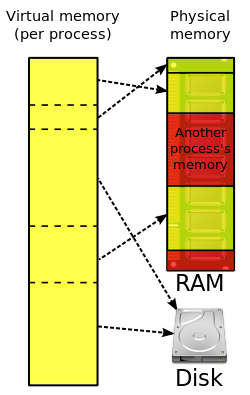
  • Virtual memory
    • The OS combines regions of the RAM + regions of the Hard disk, and provide virtual addressing for them as if they are contiguous, to be used as a RAM
    • Have larger RAM, but slower
  • Cache memory
    • Faster than rams
    • Data cache, contains the data that is accessed frequently
    • Program cache, contains instructions that is being executed


Memory Management
  • The OS is responsible for allocating/deallocating/moving the heap/stack of the different processes

Friday, September 4, 2015

#define macro with a return value!

Can be done in gcc:

#define IS_DIGIT(x) ({\
int l;\
if (x == 1){\
l = 1;\
}else{\
l = 0;\
}\
l;\
})

The above macro returns an integer l. Can be used as follows:

int x = IS_DIGIT(1);

switch vs if

if the cases of switch are consecutive numbers, then switch may be more optimized than if

Example:

If worst case--> 4 comparison

If (x == 1){
    body 1;
else if (x == 2){
    body 2;
else if(x == 3){
    body 3;

else if(x == 4){
    body 4;
}

Assembly:

beq x,1,L1
beq x,2,L2
beq x,3,L3
beq x,4,L4
...
...
...
L1:
Body 1

L2:
Body 2

L3:
Body 3

L4:
Body 4


switch worst case --> 1 comparison

switch (x){
    case 1: 
        body1;
        break;
    case 2: 
        body2;
        break;    case 3: 
        body3;
        break;    case 4: 
        body4;
        break;}

Assembly:

jumpIfLessThan x,4,switch+x-1
...
...
...
switch:
    L1
    L2
    L3
    L4

...
...
...
L1:
Body 1

L2:
Body 2

L3:
Body 3

L4:
Body 4


Modern compilers output the same assembly for both switch and if

Wednesday, August 12, 2015

Structures

While reading in the book "The complete C Reference". I got some notes!


Structures, Unions and Enumerations are declared/defined similar to each other

  • struct tag{   type member_name;
       type member_name;   type member_name;
    } variable_list;
  • union tag{   type member_name;
       type member_name;   type member_name;
    } variable_list;
  • Enumeration tag{   enumeration list
    } variable_list;
Where, tag is optional, variable list is optional, but at least one of them must exist

  • For bit fields, the bits runs from left to right or from right to left dependent on the machine
  • typedef syntax:
    typedef type_name new_name;

Wednesday, August 5, 2015

Expressions

While reading in the book "The complete C Reference". I got some notes!

Expressions

  • DataTypes:
    • char: 1 byte
    • int
    • float
    • double
    • void
  • Modifiers:
    • signed
    • unsigned
    • long 
    • short
  • DataTypes with modifiers (some notes)
    • the default is "signed"
      Ex:
      • char = signed char
    • Sizes:
      • char: 8 bits
      • short int: 16 bits
      • long int: 32 bits
      • long long int: 64 bits (added by C99)
      • float: 32 bits
      • double: 64 bits 
      • long double: 80 bits (added by C99)
  • Identifiers (variable and functions names, labels, ...etc) :
    • first character: "_" or a letter
    • other characters: "_" or letter or number
    • significant charachters:
      • internal identifiers (used only in the same file)
      • external identifiers (used in more than one file, like global variables and functions)
      • C89:
        • for internal identifiers: 31 characters are significant
        • for external identifiers: 6 characters are significant ("studentName" and "studentNameCon" will be treated as the same identifier!)
      • C99:
        • for internal identifiers: 63 characters are significant
        • for external identifiers: 31 characters are significant
  • Variables
    • C89: all variables shall be declared in the beginning of the block
    • C99: can be defined anyway
  • 4 C Scopes:
    • File Scope (variables defined in file scope are global)
    • Block Scope (variables defined in a block scope, are local to there block, also variables defined in the function definition (formal parameters) are local to the function block scope )
    • Prototype Scope (variables declared in function prototype, are local to the prototype)
    • Function Scope: applies only to the labels. (so block scope does not apply to labels, function scope is applied instead!)
      • the following code is not valid
        void func1(){
         
        fun1: goto fun2;
        }
        void fun2(){
         
        fun2: goto fun1;
        }
      • the following code is valid
        void fun1(){
         printf("fun1");
            {
               
        block1: printf("block1");
            }
            goto
        block1;
        }
  • Type Qualifiers:
    • const
      • Saved in ROM
      • The program can not change this variable
      • Other component other than the program can change the variable (ex: hardware device)
    • volatile
      • To highlight that this variable may be changed, without explicit assignment in the program
        ex:
        may be changed by HW device, by operating system, ...etc
      • This prevents compiler optimization like the following
        • y = x*3/(5x+2);    =======>     y = x*3/(5x+2);
          z = x*3/(5x+2);                 z = y;
  • Storage Class Specifiers:
    • extern  ==> the variabale is defined in other file
      • In some compilers, it is not mandatory to use "extern" key word
    • static
      • in file scope ==> the variable is file global (internal)
      • in block scope ==> the variable shall be initialized only once at the program startup
    • register
      • This variable shall be stored in a register if applicable (faster access)
      • If no registers are available, define them some how to be faster in operations.
      • Allowed for local variables.
      • Theoretically, can be ignored by the compiler if not possible, but this seldom happens.
    • auto
      • The variable is local to the function (no need to write this! all function variables are auto by default)
  • Constants
    • The compiler fits numeric constants to data types as follows:
      • Default fit
        • Integer constant: to the smallest data type fits
          • 16 >> short
          • 100000 >> long
        • Floating point constant: to double
          • 16.3 >> double
      • postfix fit
        • 12.9F or 12.9f >> float
        • 12.9L or 12.9l >> long double
        • 12U or 12u >> unsiged short
        • 12L or 12l >> long int
    • Hexadecimal and Octal
      • 0x10 ==> Hexadecimal
      • 010 ==> Octal
  • Operators:
    • Assignment operator "="
      • Multiple Assignment
        • x = z = 1;
      • Compound assignment
        • x += 1;
    • Arithmatic operators
      • ++ , --
      • - (unary operator)
      • + , / , %
      • + , - 
    • Relational and logical operators
      • !
      • > , >= , < , <=
      • == , !=
      • &&
      • ||
    • Bitwise Operators
      • & , | , ^ , ~
    • Other Operators
      • ? (ternary operator)
      • pointers: * , &
        • pointer operators and unary "-" operator have the highest precedence
    • sizeof()
      • unary operator
      • run time operator
      • returns the size of the operand (in bytes)
      • the return value is of type size_t, where:
        "size_t" is defined to be "unsigned int", using typedef
    • Comma operator
      • separates expressions
      • the result is the last expression result
      • x = (y = 5, y + 1);
        this means:
        • put y = 5
        • then put x = y + 1
    • dot (.) and  arrow (->)
      • dot (.)
        • for struct/union member reference using the struct
      • arrow (->)
        • for struct/union member reference using the struct pointer
    • () and []
      • ()
        • for precedence
      • []
        • for array indexing
    • Precedence
      • Unary operators and ?
        • associate from right to left
      • Other operators
        • associate from left to right
      • Precedence:
        • ()    []    ->    . 
        • !    ~    ++    --    -    (type)    *:at address    &:address of    sizeof
        • *    /    %
        • +    -    
        • <<    >>
        • <    <=    >    >=
        • ==    !=
        • &
        • ^
        • |
        • &&
        • ||
        • ?    :
        • =    +=    -=    *=    /=    etc
        • ,
    • Type promotion in expressions:
      • char,  short ==> int
      • if one operand is long double ==> the other is promoted to long double
      • else if one operand is double ==> the other is promoted to double
      • else if one operand is float ==> the other is promoted to float
      • else if one operand is unsigned long ==> the other is promoted to unsigned long
      • else if one operand is long ==> the other is promoted to long
      • else if one operand is unsigned int ==> the other is promoted to unsigned int
    • Example: 
      • unsigned char x = 0xFF
      • if (~x == 0x00) // evaluates to false
        • because x will be promoted to unsigned int -> 0x000000FF
        • ~x = 0xFFFFFF00